
Features for online inductions and contractor management
Create inductions from your existing material, assign them to the right people and keep completion, certificate and expiry records in one place.
01
Create inductions from your existing material
Use the files and media you already have, then manage the content directly in Tickbox.
Use the content you already have
Upload PowerPoint, Word, Excel or PDF files, and include video from YouTube or Vimeo. You can add as many inductions and courses as you need.
Your branding and web address
Use an address such as yourcompany.tickbox.nz and apply your logo, imagery and wording to the login page, induction portal and completion certificates.
Check understanding with questions
Add a multi-choice questionnaire to an induction or course. A certificate is issued only after the required questions have been answered correctly.
02
Match your organisation
Use groups, roles and locations to assign the right inductions to each person.
Groups, roles and locations
Set up groups for contractors, employees, visitors, drivers, sites or business units. Each person is assigned the inductions that apply to them.
Unlimited users and inductions
Every plan includes unlimited users, inductions, quizzes and email notifications. Pricing is based on the size of your organisation and the plan you choose, not the number of completions.
Hosted and ready to use
Tickbox is a hosted service, so there is no server or desktop software to install. You can start using a trial account straight away. If you choose assisted setup, we can typically have your initial site ready in one to two weeks.
03
Make inductions easy to complete
People can register and complete their assigned inductions online before they arrive.
Self-registration
Staff and contractors can register themselves and receive a personal login, reducing the number of accounts your administrators need to create manually.
Works on any device
Inductions run in a web browser on desktops, laptops, tablets or phones. There is no app to download or install.
Automatic reminders
Send reminders to people who have not started, have not finished or are approaching an expiry date. Administrators can also receive completion notifications.
04
Keep completion and expiry records
Store the evidence that each induction was completed and monitor when it needs to be renewed.
Automatic completion certificates
Issue a branded certificate when someone passes. The certificate is emailed to them and stored against their Tickbox record.
Personal QR codes
On higher plans, each person receives a QR code that can be scanned to check which inductions they have completed and which are still current.
Expiry and renewal reminders
Set the renewal period for each induction. Tickbox notifies the person before it expires and keeps the updated completion record.
05
Manage contractors and their documents
Give contractor companies responsibility for their workers while retaining visibility across your sites.
Contractor companies manage their workers
Contracting companies can use their own administrator login to add workers and check who has completed the required inductions.
PreQual based on your requirements
Your contractor prequalification form can be configured around the information you already collect. Companies complete it online for your team to review and approve.
Contractor document expiries
Store public liability certificates, licences, SSSPs and other documents against the contracting company, with an expiry date for each item.
Replace manual steps with one online process
Now
With Tickbox
Staff deliver the same induction each time a new person arrives
People complete the induction online before they arrive
Completion records are split between folders, inboxes and spreadsheets
Completion records are searchable in one system
Induction status has to be checked manually when someone reaches site
Administrators can check current status from a phone or computer
Expiry dates depend on someone checking a spreadsheet or calendar
Tickbox sends renewal reminders before an induction expires
Contractor documents are stored separately from induction records
Documents and their expiry dates are stored against the contractor company
Staff follow up people who have not completed an induction
Automatic reminders are sent to people who have not finished
Printed and emailed copies can become out of date
Administrators update one current version of each induction
Integrations
Send new starters from PICMI
Connect PICMI hiring and onboarding with Tickbox so new and seasonal workers can be assigned their inductions without re-entering their details.
Check induction status at sign-in
Connect Tickbox with VisTab or Attendance so induction status can be checked as a visitor or contractor signs in.
Connect other systems through the API
Use the Tickbox API to connect other visitor or contractor management systems. Integration work is scoped and quoted separately.
Use single sign-on for staff
On higher plans, employees can use their existing organisation login to access internal inductions.
Import content from PowerPoint, Word, Excel, PDF, YouTube and Vimeo. Export reports as CSV.
Security and data hosting
Information for IT and procurement teams.
Hosted in New Zealand
Tickbox runs on SiteHost infrastructure in Auckland. Your data is stored in New Zealand, under New Zealand law.
Your own database
Each customer's data is stored in a separate database.
Encrypted in transit
An SSL certificate is included with every site, so logins, content and personal details are sent over HTTPS.
Backed up daily
Backups run daily. You can also export your records to CSV as part of your own record-keeping process.
You control who sees what
Configure administrator access around your groups, roles and locations. Contractor administrators can see only their own workers.
NZ support, NZ law
Support is available by email or phone during New Zealand business hours. Agreements are governed by New Zealand law and can be cancelled on one month's notice.
Reporting and exports
Review current records online and export them when needed.
Completion report: see who has completed, started or not started an induction, filtered by group, location or induction.
Expiration report: see which inductions are approaching their expiry date.
Inactivity report: find people who registered but did not continue, or have not used the system recently.
Induction history: review the inductions a person completed, including dates and quiz results.
Staff and contractor profiles: review the information and records stored against each person.
Everything exports to CSV: download reports for use in Excel, Google Sheets or your existing reporting process.
Certificates as PDF: issue branded PDF certificates by email and retain a copy on the person's record.
Complete inductions on common devices
Tickbox works in a web browser, with no separate app to install.
No app required
People open Tickbox in a web browser, register and begin their assigned induction without downloading an app.
Designed for smaller screens
Induction content, video and questions are designed to work on phones as well as desktop computers.
Use a phone, tablet or computer
Tickbox works in current web browsers on common mobile and desktop devices.
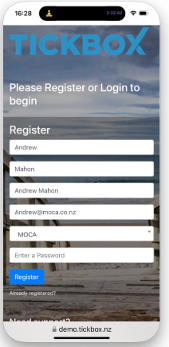
Register on their own phone.
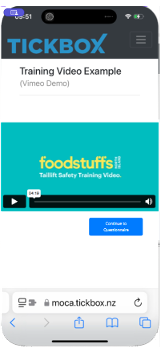
Video inside the induction.
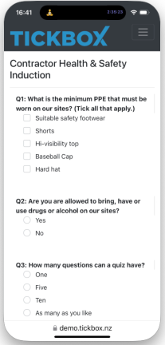
The questions at the end.
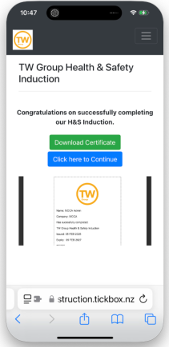
Completion certificate.
What it costs
Plans start from $85 + GST a month. Set Tickbox up yourself, or choose assisted setup from $500 + GST.
Every plan includes unlimited users, unlimited inductions and unlimited quizzes, so what you pay is set by the size of your organisation and the plan you're on, not by how many people you put through it.
Tell us roughly how many people, sites and monthly inductions and we'll price it. We're here to help and you can be sure of a prompt response.
Book a Tickbox demonstration
Tell us how you manage inductions now and we'll show you the features that are relevant to your workplace.
Prefer to talk? Call 07 542 3453 or email us.
Thanks, we've got it.
We'll reply shortly. If it's urgent, call 07 542 3453.